chat gpt를 사용하다보면 어느순간부터 something went wrong. 이라는 오류와 함께 chat gpt 오류가 발생합니다. 이런 경우 chat gpt에 어떤 질문을 하더라도 답을 받을 수 없는데 고객센터에 문의해도 큰 의미는 없습니다. 이렇게 고생하시는 분들에게 chat gpt 오류 해결 방법을 소개해드리겠습니다.
1. something went wrong 오류
평범하게 사용하다가 갑작스럽게 ‘something went wrong. if this issue persists please contact us through our help center at help.openai.com.’ 라는 문구와 함께 chat gpt가 작동하지 않습니다.

이럴때 chat gpt help.openai.com에 질문을 하더라도 google에 검색하면 나오는 뻔한 답장만 해주고 원하는 답을 얻을 수 없습니다.
아래는 hep.openai.com 에서 문의한 답변입니다.
Hi there,
I’m sorry to hear you’re experiencing issues with logging into ChatGPT. The error message you’re encountering, “Something went wrong. If this issue persists please contact us through our help center at help.openai.com,” typically indicates a temporary issue that can often be resolved with a few troubleshooting steps. Here are some suggestions to help you get back to using ChatGPT:
- Clear your browser’s cache and cookies: Sometimes, outdated cache data can cause unexpected behavior with web applications. Clearing your browser’s cache and cookies can often resolve these issues.
- Try a different browser or an incognito window: This can help determine if the issue is specific to your current browser or a browser extension that might be interfering with ChatGPT.
- Check your network connection: Sometimes, network issues can cause problems with accessing online services. Try using a different network connection if possible.
- Disable VPNs or Web Protect: If you’re using a VPN or a web protection service, try disabling it. These services can sometimes interfere with your connection to ChatGPT.
- Wait and try again: Server errors can occur during periods of high traffic. Waiting a few minutes and then trying to log in again can sometimes resolve the issue.
If you’ve tried these steps and are still unable to log in, or if the problem persists, please reach out to us directly for further assistance. You can contact our support team by visiting our Help Center and initiating a new chat. We’re here to help resolve your issue as quickly as possible.
Best,
OpenAI Team
이런 답변을 받으면 대표적으로 하는 방법은 두가지입니다.
- 인터넷 기록, 쿠키 삭제
- 크롬의 시크릿 창에서 이용하기
두가지 방법입니다.
저는 두가지 방법 다 사용해봤지만 어떠한 방법을 사용하더라도 원하는 결과를 얻을 수 없었습니다.
chat gpt 이용자들 역시 같은 고민을 하고있지만 원하는 답을 얻을 수 없는 경우가 대부분입니다.
아래 바로가기를 클릭하면 chat gpt 이용자들의 문의 확인이 가능합니다.
2. something went wrong 오류 해결방법
위의 방법들로 해결이 되지 않을 때 이용 가능한 방법입니다.
왼쪽 위를 보면 GPT-4o mini 버전으로 설정이 되어있는 경우 chat gpt가 오류가 나는 경우가 있습니다.
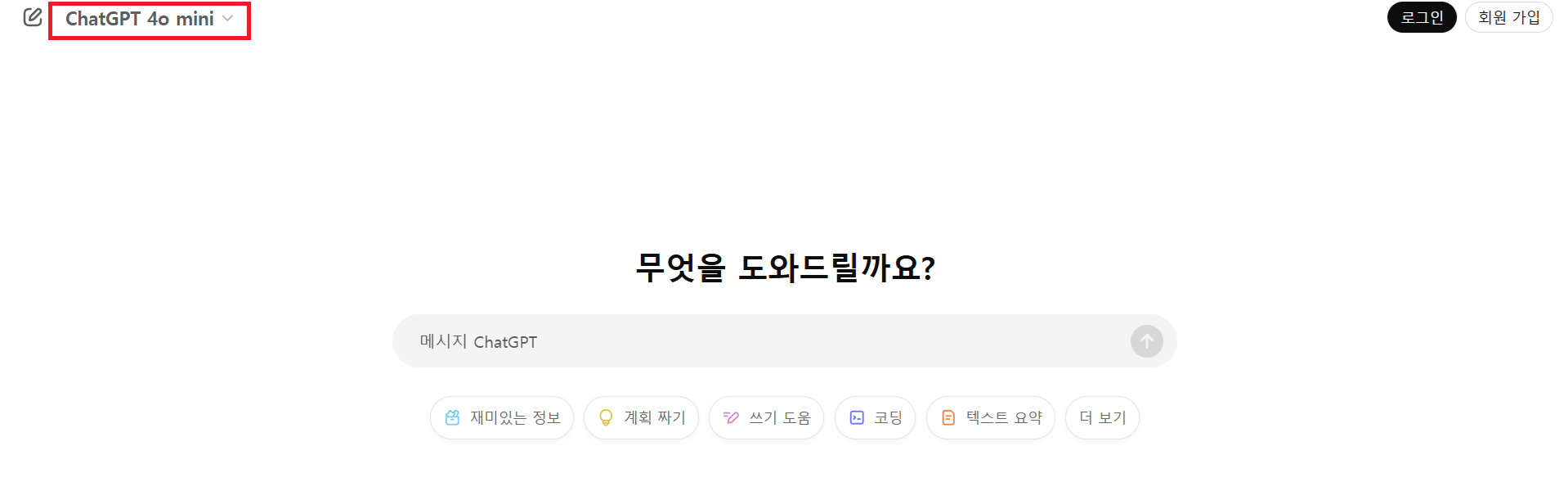
Chat GPT 4o mini를 클릭 후 ChatGPT 버전으로 변경하시면 다시 정상적으로 chatGPT를 이용 가능합니다.
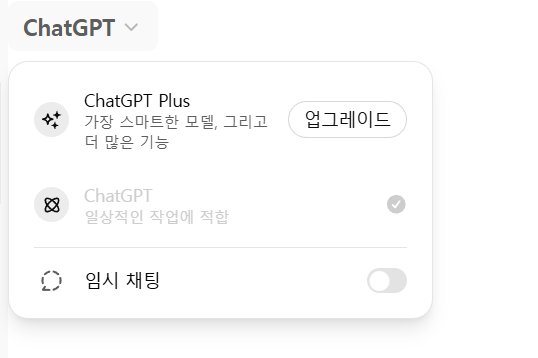
고객센터에서 원하는 답변을 받지 못할 경우 꼭 확인해보시기 바랍니다.
3. 위의 해결방법이 안되는 경우
유행하는 사진을 지브리, 디즈니 방식으로 변경하는 유행 때문에 gpt가 오류가 발생하는 경우가 많습니다. 이럴때는 많은 사람들이 이용중이라 다른 시간에 이용하거나, 내가 다 무료 질문을 다 소모해서 시간이 지나고 다시 질문하면 답변을 받을 수 있습니다.